
Lossless photo rotating app
Ever had the problem of pictures taken in portrait showing up in landscape in emails, digital photo frames, on your blog or on your mobile device? JPEG Autorotate is the solution. It’s quick, it’s simple, it’s (mostly) free.
Hallelujah! Wish I’d found this a few months ago when I sorted through 2000 vacation photos. Never again!
Kristina
JPEG Autorotate adds menu items to Windows File Explorer for folders and photo files (.jpg, .jpeg). Just right click your photos or folders, and go:

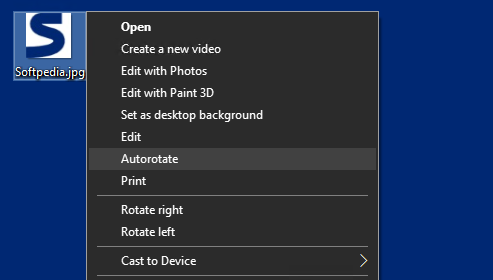
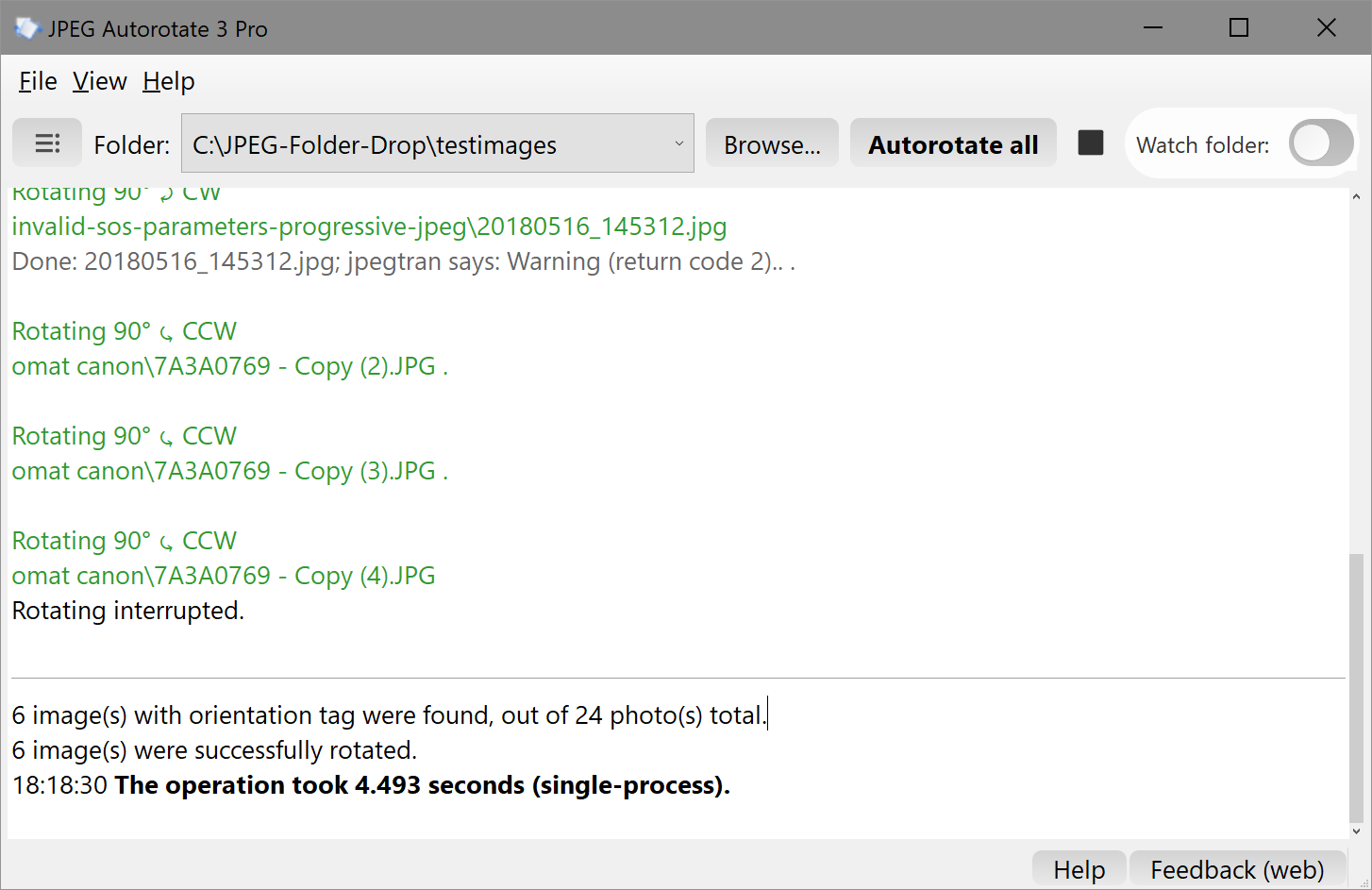
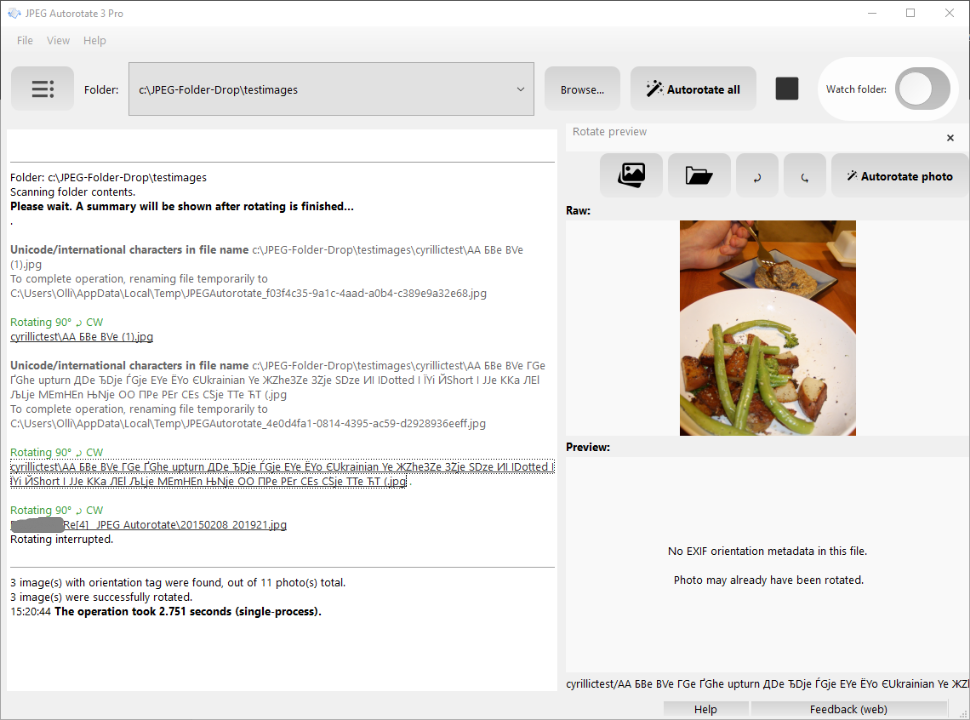
You can effortlessly rotate, with no quality loss:
- single images,
- all images in a folder and its subfolders
according to the EXIF orientation metadata (stored in photos by most digital cameras). This means your photos will permanently appear the way they were originally intended, the right way up.
Photos from most phones & cameras already contain the info needed to rotate photos the right way up. This little app automatically makes sure your photos show up correctly everywhere. No need to do this by hand anymore.
Please note that photos from flatbed scanners typically do not provide EXIF orientation data at all, so automatic rotation is not possible in these cases. JPEG Autorotate can still help you manually rotate your photos in these cases. See details
Candace, April 2024
…Thank you for your help! We do love your app just as much and it has been a HUGE help for our business to rotate thousands of pictures we take on our iPhones. We repurchased again last night… We were happy to pay again as this program has done quite a bit for us throughout the years!… This program has truly helped us in so many ways and I am forever grateful for it!
melissa 🙂
bless your dear, sweet little website for offering me the means by which i may now autorotate with glee! thank you for saving me fingers! <3 <3 <3 ^_^
Excellent piece of software! Sometimes the simple things take a long time to do and rotating dozens of pictures is one of them… Thank you very much from Portugal!
antonio
Version 3 includes the following:
Added:- clearer rotate output
- rotated folder history
- support for non-standard photos which used to fail in earlier versions (Boosted license)
- photo rotate previews (Boosted license)
- support for international filenames (Boosted license)
- rotating all photos dropped in a folder (Pro license)
Comments & feedback
The previous 200 comments can be found here: JPEG Autorotate 2 feedback.
Also see: Testimonials for version 3
Just tested this program on pictures I took in Asheville, NC. Did one hell of a job rotating the pictures.
Thanks Edward! Be sure to sign up for the email list, version 3 is right around the corner. It’ll positively blow your mind 🙂
Hi, i have installed the programm on win7 and then i tried to start (exe and bat too) but nothing happend.
There ist no gui as described – whats going wrong?
Thanx
Hi Otto!
You’ll need to right click on a folder or a jpeg file in Windows explorer. There should be an option to trigger rotating there “Autorotate all JPEGs in folder” or “Autorotate”. Does that help?
There is also a
betaGUI version 3.0.EDIT 2019-12-07: GUI version is now available! Just download version 3.0. You can either use Windows File Explorer right click menus, or start up the app and select a folder or file to rotate from there.
Thanks for this comment. I was wondering that myself.
I’ve been trying to solve this problem for years. The Windows picture import used to rotate the pictures and then it stopped working and I could never solve it. Hours spent manually rotating pictures after importing them to Windows. Finally, something that is quick and it works!! Thank you so much.
Hello,
I got a new PC recently and copied over my photos and images from my Windows 7 PC only to find some of them have automatically rotated – presumably undoing the rotation of the camera/phone when they were taken, even though that means they are now incorrectly orientated. I can see the Orientation info on those that have rotated is 270 and the ones that haven’t is Normal, so I thought JPEG Autorotate would return the 270 files to how they should be but when I run the ‘Autorotate’ process all it does is change the Orientation setting to Normal, the photos themselves are still the wrong way up. I am doing something wrong here? Or perhaps I’ve misunderstood what the software does? I’d appreciate your advice, thank you.
Hi Fiona. The issues you are facing may be due to Windows 7’s faulty import functionality. Do the instructions here help? https://savolai.net/software/jpeg-autorotate/faq/#Issues_with_Windows_7
Hi, I don’t think this can be it as I didn’t use the import functionality, I just copied my picture folder onto a removable HD drive and then onto the Windows 10 PC. Interesting thing is most of the problem ones are pics sent to me from someone’s phone and I’ve edited and in some cases rotated to the correct way up, then after copying they’re rotated incorrectly – I haven’t checked but it might be to the original way they were taken or even taking into account how the phone was rotated to take the photo in the first place. It’s very odd! Anyway I’m gradually getting them sorted now, thanks.
Thank you!! This saved me a ton of work with changing the orientation on my photos for my mother’s digital photo frame she is getting for Christmas!! It’s a total lifesaver!!
Excellent work.
Is there something similar for videos?
Or at least windows 7 media player that autorotates videos?
Thanks
Thanks Omar. I’m afraid rotating videos is a whole challenge of its own.
I have over 16,000 jpegs on a USB which I display on a NIX 15 inch Digital Frame X15D purchased new in 2019. On Windows 10, all 16,000 are oriented correctly. However, on the NIX display, many pictures photographed in Portrait orientation are rotated incorrectly and displayed sideways in Landscape orientation. This is frustrating because I can only identify the problematic pictures on the Digital Frame (again, because Windows 10 displays them properly). Rotating them on the Digital Frame is possible, but very tedious and most importantly corrected only in the display’s internal memory – and not on the USB (meaning the next time the USB is loaded following a power reset, the pictures revert to their original mis-orientated state).
It’s at this point which I found your website, which according to how I understand the documentation, your product should address this issue. I therefore installed JPEG Autorotate Version 3 on December 28, 2019.
Given the consistently positive reviews you received, perhaps I am using your product incorrectly as my results were not at all as expected. After processing the 16,000 pictures using JPEG Autorotate V3 (Trial Version), 51 pictures were rotated by “JPEG Autorotate”. Of those 51 pictures (i) 45 should not have been processed/rotated, as they were oriented correctly both on Windows and the NIX display, (ii) 2 pictures should have been rotated but were not, (iii) 4 pictures were rotated when they shouldn’t have been, (iv) an undetermined number of mis-oriented pictures were not processed at all by JPEG Autorotate.
Any suggestions would be greatly appreciated.
Thanks for your message Neil! Sorry to hear this.
Unfortunately, I can no longer support individual cases for free version users. However, if you have made backups before doing the operation: you may want to check out the orientation metadata value of the originals (which had unexpected results) e.g. using this tool and see if the correct orientation data is there in the first place.
https://www.verexif.com/en/
JPEG Autorotate uses standard open source tools such as easyexif and jpegtran to detect the orientation tag and to do the actual rotation. So you may also want to try them to see if you still get similar results. There are millions of images out there and the various versions of metadata produced is a jungle in itself. See this: https://www.daveperrett.com/articles/2012/07/28/exif-orientation-handling-is-a-ghetto/
If you would like to buy a license I’ll be happy to receive your image samples by email and diagnose deeper. (Of course, buying a license will also make future maintenance of the app possible. )
In that case, it would be helpful to attach JPEG Autorotate output and the output in the detailed output window (this can be shown via the View menu), in case there were any error messages.
I appreciate your timely and considered response. Since writing my comment earlier today, I have updated the NIX X15D display’s firmware which seems to have addressed most (all?) of the initial orientation issues – which is my only concern. (In other words, using the same USB as described above, it appears that with the firmware upgrade, the NIX is orientating the pictures correctly and consistently with Windows 10). Thank you again for getting back to me.
Thank you for this! I just did a quick try and it works great. Just a small detail, although the images are rotated correctly, the thumbnail on Windows (7) remains as it was prior the rotation to the actual image took pace. Do you know why this is? Is it necessary to clear cache? Thanks!
I’ll answer this to myself. Indeed, after going to the Windows-integrated disk-clear-up option, I cleaned all the thumbnail cache and after reopening the window/or system restart the images show also on the thumbnail on the correct position 🙂
Hi Alex!
Please see this section of the Questions & Answers page for more details:
https://savolai.net/software/jpeg-autorotate/faq/#Photo_thumbnails_not_updating_in_Windows_Explorer
Thank you for the link!
Just bought Autorotate Boost. Saved me from returning a digital photo frame when the problem was with 70 of my 400 photos. Autorototate corrected 62 photos in 2 minutes and identified the other 8, which were easy to rotate manually. Truly a huge time saver.
Great program, thank yuo!
got a license and am encountering lot of errors like this one…
4 image(s) with orientation tag were found, out of 8509 photo(s) total.
0 image(s) were successfully rotated.
12:26:50 The operation took 47 minutes 26 seconds (single-process).
92 image(s) with orientation tag were found, out of 4557 photo(s) total.
0 image(s) were successfully rotated.
12:07:04 The operation took 26 minutes 50 seconds (single-process).
most of the error codes are 0, 1983, 1985
Hi Ciju!
Please send an email with the full program output along with a sample of a photo that JPEG Autorotate recognizes to have an orientation tag. I’ll take a look.
Hi, Thank for this exeptionnal application. i have one question: it’s possible to translate this apps in French ?
Hi David. Sure, technically it is possible, and most of the infrastructure is there. It would require a bit of work, and I’m currently not sure if the critical mass of non-English speaking users is there yet.
Hello! I love the idea behind this product. I have 2 questions…. For the Pro license, is this a one time fee? Though the software is called JPEG Autorotate — Does it work with other image formats such as png, tiff? Thanks!
Currently this is just for JPEG images. The main use case for this app is rotating photographs, and JPEG is still the most widely used format for those. To my knowledge PNG or TIFF images typically don’t have EXIF orientation data that this app could use to rotate the photos.
Freaking Fantastic! Many thanks.
Cannot unistall. No unistall Executable in package.
Sounds odd. It is set up to generate uninstall.exe. Not sure why it’s not doing that for you. Two caveats though: getting that .exe signed is really tricky with NSIS that I’m using, and current 3.20 uninstaller forgets to remove a single file.
Hi. This has now been fixed.
I’ve just released version 3.24. The uninstaller is now included in the installer in a more reliable way (static uninstaller file in addition to dynamic generating) and should thus be always available.
Hi,
Cannot Uninstall. No .exe file found. Please help.
Hi. Please report the version of JPEG Autorotate you are using. If you install the newest version does that make uninstaller.exe appear in the Program Files\JPEG Autorotate folder?
Using V3.2. Uninstaller only appears in folder as “uninstaller.ini”. There is no “unistall.exe” in folder.
Now fixed in 3.2.1.
Hi. This has now been fixed.
I’ve just released version 3.24. The uninstaller is now included in the installer in a more reliable way (static uninstaller file in addition to dynamic generating) and should thus be always available.
Hello my name is Luis, and i am Portuguese, home user and amateur photo lover.
A must have tool for those who want to do a efficient work rotating thousands of photographs with one click, without worry, without loss quality and a quicker job. You be able to resume after each job, with all you need to correct some photo, not that it need it, but, if so, it will be there. Hard work transformed in an easy work in seconds.
Just go here https://savolai.net/software/jpeg-autorotate/?smd_process_download=1&download_id=3924 and buy it, easy, lovely and granted software.
After you buy it he will contact you to do the final steps of registration.
Just do it for your work, you won’t be disappointed.
It literally save my life. I had to syncronize some pictures for tomorrow and there were a hell of a pain because it was cracly rotated. The software completly solved my problem.
Happy to hear that! It’s not every day one gets to literally save lives 😊
Thank you, just what i was looking for my Win 7 machines
I installed the program yesterday on my new laptop, but at the first run (5 photo’s), it already complains that I used the maximum number of free rotates, so it doesn’t doe anything
“You’ve processed maximum number of photos (autorotating entire folders) using the free version.
The free version has a limit of 800 rotates before it will stop rotating batches of photos automatically.”
Thanks Marijke. This is a bug that seems to occur rarely so I’ve been unable to locate it’s origin so far. How many photos were there in the folder in total?
5 photo’s
Hi Marijke. Thanks for your messages. Please check your email for further instructions.
same issue for me.. says ive used 800 rottes but havnt used any
Hi! Thanks for your message. Please contact us through the contact form with a working email address so we can find a solution.
Hi, Firstly nice tool. However running over a batch of files on a slow network share runs badly. The UI stalls out while the rotation tools run, and you have to click and hold to resize the window or do anything with it. It looks like you are running the rotation in the GUI Thread. I think this really needs to be moved to a background task, and even better if I can run multiple background tasks in parallel, as there is a lot of dead time opening and closing so many files in sequence. Running 3 threads would likely increase the speed enormously. I have been checking back for an update every soft often, but it seems you are not working on this anymore. It would be great if you could look at these two problems.
Thanks Adam. You’re right, this was not designed for such scenarios. The rotate executables themselves do run in separate processes, but if file system access is very slow I imagine it can stall the UI.